


Welcome back readers, In this tutorial we are going to show you how to make an undetectable keylogger to most antivirus programs (AVG,AVAST,KASPERSKY).Already we had showed you how to make an key logger in our previous tutorial, if you do not know about it first read that here
Tools required:
*Xenocode post build 2009 for .NET beta
*Hex workshop HEX editor
You can download these from this link (Download mirror)
Step 1: Initially disable your antivirus protection (Here I am using AVG antivirus Right click on AVG and click “Temporarily disable AVG protection” and select ” Until I restart next time”

Step 2: Install Xenocode post build 2009 for .NET beta & Hex workshop HEX editor.Also don’t forget to use the crack

Step 3: Open Xenocode post build 2009 for .NET beta from program files and go to Application tab and click “ADD” option from that and add your keylogger file (ie, already prepared through NEPTUNE keylogger or any other.Here)


Step 4: Now go to “VIRTUALIZE” tab and click “ENABLE” check box at left side. Then go to “GENERAL” tab there. Uncheck the “INHERIT PROPERTIES” tick box at right corner. Then change the product title, publisher, description, website, version to your desired (Here I use AVG v11.3.4, AVG corporation, AVG , www.avg.com ,AVG.(Optional:If you want to change the icon click “BROWSE “ option and select the required application and automatically it will change to that app icon.)


Step 5:Now click “XENOCODE APPLICATION “and save it.

Step 6: Now your keylogger file will appear as shown(With avg icon making it undetectable to victim)

Step 7: Now go to “Hex workshop HEX editor (32 bit)” from “All programs”

Step 8: click “File->open->your keylogger file

Step 9: Press “Ctrl+F” which opens Find dialog box change type to “TEXT STRING” and search for “COPYRIGHT”

Step 10: It will show the result as follows

Step 11: Now select these codes as shown in fig(....... inflate 1.2.3 copyright)

Step 12: Now right click on the selected area and click “FILL” option from that,then click OK.


Step 13: Result will change all binary codes to 00 as shown
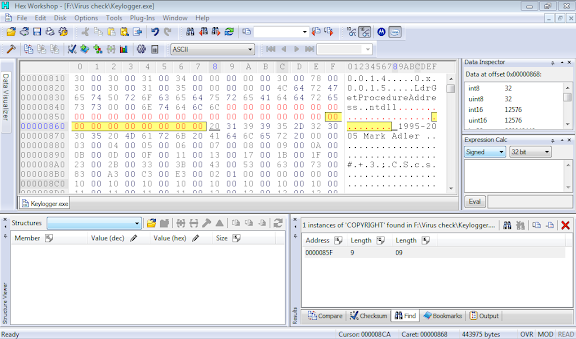
Step 14: Then manually search for “X.e.n.o.c.o.d.e. .V.i.r.t.u.a.l. .A.p.p.l.i.a.n.c.e. .R.u.n.t.i.m.e”(Ctrl+F feature cannot be used here, if required use Ctrl+F and search for letter X and find X.e.n.o.c.o.d.e)

Step 15: again as step 12 right click on the selected area and click “FILL” option from that, and then click OK.

Then it will look as

Step 16: click save option from File->save.

On that dialog box click Yes. Then it will be automatically saved to your key logger file.
Step 17:Turn back the antivirus and scan that key logger file.

Hurrah!!!! Yes you made it ,an undetectable key logger J !!!This file is not detected by most antivirus (AVG,AVST,KASPERSKY)which is used by most of our friends. You cancheck it through online scanners as shown
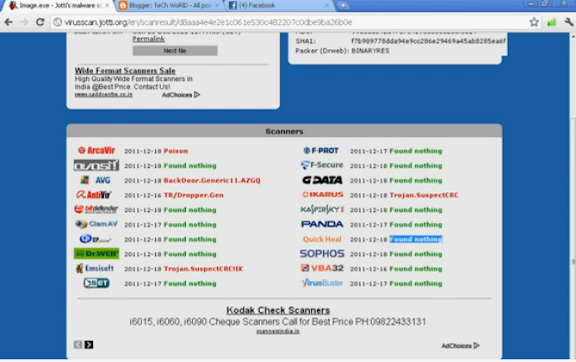
Now send that keylogger file to your victim which would not be detected by his antivirus.
If you have any clarifications comment on these post and we will try to solve it at best
If you have any clarifications comment on these post and we will try to solve it at best


